

Cookie Management Guide
This comprehensive guide explains how Consent Pro automatically manages cookies based on user consent to ensure GDPR and CCPA compliance for your Webflow website.
Table of Contents
- How Cookie Management Works
- Essential Cookies Overview
- Cookie Database
- Default Whitelisted Cookies
- Custom Configuration
How Cookie Management Works
When users deny consent for a category, Consent Pro automatically scans and removes associated cookies while preserving essential functionality.
Automatic Cookie Cleanup Process
- Consent Change Detection - Triggered when user updates preferences
- Cookie Scanning - Scans all existing browser cookies
- Database Matching - Matches cookies against the Open Cookie Database and our internal Cookie Database
- Category Filtering - Removes cookies from denied consent categories
- Whitelist Protection - Preserves essential and user-defined cookies
Essential Cookies Overview
Consent Pro sets several essential cookies to manage user consent preferences and ensure proper functionality. These cookies are always enabled and are required for the core operation of the consent management system.
🍪 Cookie Overview – Consent Management System
Below is a comprehensive list of all cookies set by the system, along with their descriptions:
Cookies & Their Descriptions
fs-consent- Main consent cookie storing user preferences in JSON format (includes ID and consent choices per category)fs-consent-updated- Marks if the user has updated their consent settings. Set to"true"upon changesfs-consent-ad_storage- Stores whether ad storage is allowed ("true"or"false"). For Google Tag Manager consent modefs-consent-ad_user_data- Stores whether ad user data consent is granted or deniedfs-consent-ad_personalization- Indicates consent for ad personalizationfs-consent-analytics_storage- Indicates if analytics storage is allowedfs-consent-functionality_storage- Indicates if functionality storage is permittedfs-consent-personalization_storage- Reflects consent for personalization storage
Common Cookie Properties
- Expiration: Defaults to 120 days, but configurable
- SameSite: Set to "None" for compatibility in third-party contexts
- Secure: Always set to
true– sent only over HTTPS - Domain: Auto-detected from hostname or set via configuration (special handling for Webflow.io domains)
Consent Categories
- Essential – Required for core functionality (always enabled)
- Marketing – Covers advertising/marketing-related cookies
- Analytics – For tracking and measurement purposes
- Personalization – Controls cookies related to user preferences and customization
Important Note: None of the cookies store any user identifiable information. The information stored is strictly used for the solution's internal logic, with no user identifiable information included.
Cookie Database
Consent Pro uses a combination of our Internal Cookie Database and the Open Cookie Database to automatically identify and categorize cookies from popular services.
Supported Categories
- Essential - Required functionality cookies
- Analytics - Web analytics and performance tracking
- Marketing - Advertising and marketing cookies
- Personalization - User preferences and customization
- Uncategorized - Third-party cookies not in other categories
Default Whitelisted Cookies
These cookies are automatically preserved regardless of consent settings:
Core Consent Management
The following essential cookies are automatically whitelisted for internal state management:
fs-consent- Stores user consent preferencesfs-consent-updated- Tracks consent update statefs-consent-ad_storage- Ad storage consent statefs-consent-ad_user_data- Ad user data consent statefs-consent-ad_personalization- Ad personalization consent statefs-consent-analytics_storage- Analytics storage consent statefs-consent-functionality_storage- Functionality storage consent statefs-consent-personalization_storage- Personalization storage consent state
Automatic Whitelist Prefixes
You can add this prefix to your Cookie to have it whitelisted by our Solution
fscw_*- Any cookie starting withfscw_(Finsweet Consent Whitelist)
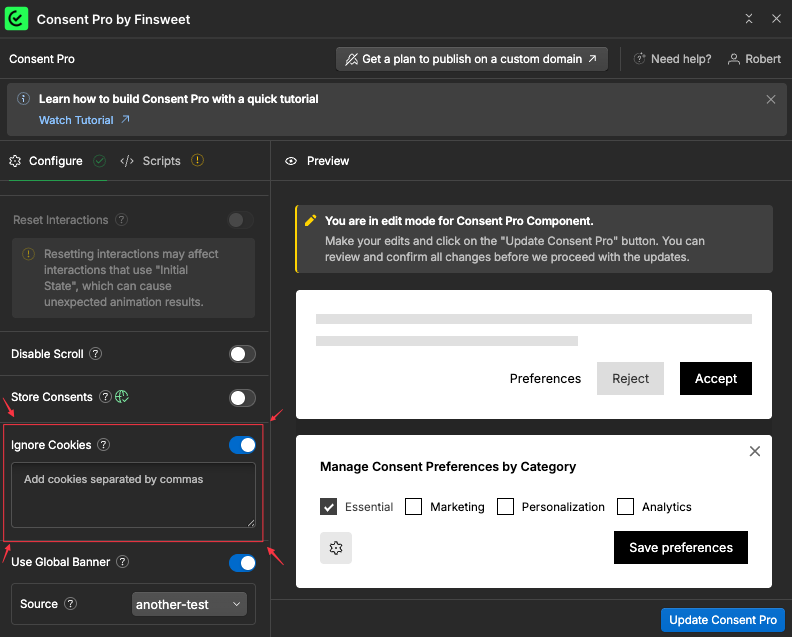
Custom Cookies Whitelist using Consent Pro Webflow App
Specify the list of cookies to be ignored inside the Webflow app, and Consent Pro will automatically whitelist those cookies
Custom Configuration
Cookie Expiration
You can customize the expiration time for consent cookies through the Consent Pro configuration. The default is 120 days, but this can be adjusted based on your compliance requirements.
Domain Configuration
Consent Pro automatically detects the hostname for cookie domain settings. For Webflow.io domains, special handling is implemented to ensure proper cookie functionality across subdomains.
Security Settings
All consent cookies are automatically configured with:
- Secure flag: Ensures cookies are only sent over HTTPS connections
- SameSite=None: Provides compatibility in third-party contexts while maintaining security
- HttpOnly protection: Where applicable, prevents client-side JavaScript access to sensitive consent data