

Debugger
The Consent Pro Debugger is a visual overlay that helps you test and verify your consent banner configuration on your Webflow staging site (*.webflow.io).
Staging only
The debugger only loads on *.webflow.io URLs. It will not activate on custom production domains.
Opening the Debugger
There are two ways to launch the debugger:
From the Consent Pro app
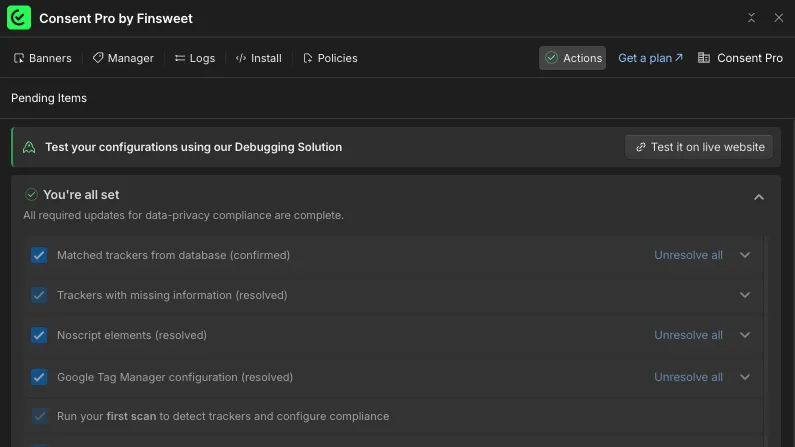
When you have solved action items and none remain pending, a notification appears with a "Test it on live website" button. Clicking it opens your Webflow staging site with the debugger active.
Via URL parameter
Add ?consentpro-debugger=true to any page URL on your *.webflow.io staging site where Consent Pro is installed:
https://yoursite.webflow.io?consentpro-debugger=trueWhat the Debugger shows
The debugger panel displays:
- Banner Setup — your active banner type and detected region.
- Initial Checks — whether the Consent Pro script loaded and the correct banner is displayed. If your project uses Google Fonts, a self-hosting check is also shown.
- Trackers before user interaction — which tracker categories are blocked or allowed before the visitor interacts with the banner.
- Trackers after user interaction — how tracker categories change after the visitor accepts, rejects, or customizes consent.
- Log Record — the stored consent record ID, date, and time (shown after the visitor interacts with the banner).
Simulating regions and banner types
If your project has multiple banner configurations (e.g., Opt In for EU, Opt Out for US), you can simulate different setups using the dropdowns in the Banner Setup card. This changes the URL parameters and reloads the page to show the selected configuration.
The following URL parameters are available:
| Parameter | Description |
|---|---|
consentpro-debugger=true | Activates the debugger overlay (only on *.webflow.io staging URLs) |
consentpro-region | Simulates a visitor region (e.g., EU, US, BR) |
consentpro-mode | Selects a specific banner instance by key |
consentpro-banner-type | Debugger-only preview by banner type (e.g., opt-in, opt-out); does not affect live visitors |
Switching consentpro-region to a value that differs from any previously stored consent automatically clears the consent cookie and re-shows the banner — you don't need to click Reset Banner just to test a new region.
Resetting consent
Click Reset Banner in the debugger footer to clear the consent cookie and remove simulation parameters (consentpro-region, consentpro-mode, and consentpro-banner-type). The debugger stays active (consentpro-debugger=true remains in the URL).